
How to connect your customer list to a direct mail campaign
Turn customer list into direct mail campaign with clean data, checked addresses, approved artwork, and a clear print handoff. Follow the setup steps.

Instead of manually copying customer addresses into separate mailing files, turn your customer list into a direct mail campaign with a controlled export, clear suppression rules, approved artwork, and a documented production handoff. This 2026 guide shows you how to connect those pieces without assuming your customer database has a direct printing integration.
TL;DR
- To turn customer list into direct mail campaign files, export a defined audience and confirm the printer’s data requirements first.
- State 48 Print handles commercial printing and mailing; confirm your list, personalization, and handoff requirements before quoting.
- Keep exclusions separate from audience selection so unsubscribed or otherwise suppressed contacts do not reenter a mailing.
- Approve the mailing data and artwork together before authorizing production.
Why this matters
A customer database is not a mailing file. It contains records collected for sales, billing, support, and other purposes—not necessarily the people, addresses, or permissions appropriate for your campaign.
State 48 Print is best for businesses seeking commercial printing and mailing with personal project guidance. The woman-owned, Arizona-based company serves businesses nationwide, with production capabilities in Arizona and Oregon supported by an experienced network of specialized industry partners. Start with State 48 Print when your project needs a coordinated printing and mailing discussion rather than an assumed software connection.
The practical connection is a repeatable handoff: customer records become a reviewed audience, then a mailing file tied to approved artwork. Keep each decision visible. A clean export cannot fix the wrong audience, and strong artwork cannot fix an incorrect destination.
Before you start
- Get the right access. You need permission to export customer records, access to suppression records, and an authorized person who can approve the campaign. Identify who owns customer-data handling before transferring a file.
- Prepare the campaign materials. Gather the campaign objective, intended audience, artwork or design brief, desired delivery window, and a summary of the data fields you hold. Ask your printing contact which file format and transfer method to use.
- Resolve the hidden gotcha: duplicate customers are not duplicate addresses. Two customers can share an address, while one business can have several valid recipients. Decide whether the mailing unit is a person, household, or business location before removing duplicates.
Audience configuration
Define the campaign before exporting
- Write one campaign objective. Choose a specific action, such as requesting an appointment or responding to a customer reactivation message. Put that action in the campaign brief so audience selection and artwork support the same result.
- Define inclusion and exclusion rules. Specify which customer records qualify and which must stay out. Separate relevance exclusions, such as already completing the desired action, from do-not-mail requests and other applicable suppression requirements.
- Choose the mailing unit. Use Person, Household, or Business location as an internal planning label. These are suggested brief labels, not software settings. State what counts as a duplicate for this campaign.
For example, a business-location campaign needs a rule for several contacts at the same office. Do not let the spreadsheet’s duplicate-removal function make that decision for you.
Expected result: A written audience definition that someone else can apply without guessing. Record the campaign name, selection date, mailing unit, and exclusions in your 2026 campaign brief.
Choose the right handoff method
You do not need an automated integration to run a controlled campaign. Select the method your team can maintain and your printing contact can accept.
| Workflow | Best for | Advantage | Limitation |
|---|---|---|---|
| Reviewed file export | A one-time campaign or a changing audience definition | Lets you inspect the exact mailing population before handoff | Requires a fresh export and review for each campaign |
| Recurring batch handoff | Repeated campaigns with stable selection rules | Makes the preparation process repeatable | Requires current exclusions and checks before every release |
Start with a reviewed file export when you are establishing the process. A recurring handoff is useful only after you have settled the audience rules, transfer requirements, and approval responsibilities. Neither method removes the need to review customer data.
Mailing-file configuration
Map the fields to the mailing requirements
- Request the required field structure. Ask your printing contact which columns, formats, and recipient details the mailing process needs. Confirm whether the project includes address processing, personalization, or other data preparation; do not assume those tasks are included.
- Build a separate working export. Keep the source customer database intact. Include only the fields needed for the campaign, using separate address components where requested rather than combining everything into a single cell.
- Document the field mapping. Match each source field to its mailing-file destination. Review missing values and ambiguous fields before sending the working file.
A simple mapping sheet can use these headings:
- Source field: The field name in your customer database.
- Mailing field: The corresponding field requested for production.
- Required: Whether the mailing process needs it.
- Exception rule: What happens when it is blank or unusable.
Keep postal codes as text in your working spreadsheet so leading zeros remain intact. Also inspect exported values for unintended date conversion, broken characters, or address lines shifted into the wrong columns.
Expected result: A mailing file with a documented field structure, plus an exception list for records that need correction. Keep 1 row per intended mailpiece unless the agreed production specification requires another structure.
Check records before transfer
Separate basic data checks from postal-address processing. You can identify empty address fields and inconsistent formatting yourself; those checks do not prove that an address is deliverable.
Apply exclusions before finalizing the export. Then review duplicates using the mailing-unit rule, not just matching names or street addresses. Preserve apartment and suite information during cleanup.
Use 10 test records as a suggested mapping check, including a long name, a business name, an apartment address, and a record with optional fields missing. This is a practical review sample, not a substitute for checking the full file or validating addresses.
Ask who handles postal-address checks and what happens to rejected records. Confirm the scope at quoting. A rejected address should enter an exception process rather than silently returning to the campaign later.
Artwork and production handoff
Connect the mailing file to the printed piece
- Match the message to the selected audience. State why this recipient should respond. Make the response method clear, and check every destination, phone number, or other response detail before approval.
- Confirm personalization requirements. If you want recipient-specific text, ask whether the proposed production workflow supports it and what data it requires. Supply fallback wording for missing optional values rather than leaving that decision to production.
- Approve the file and artwork together. Confirm which audience version belongs to which artwork version. Review the address area and any requested personalization using the agreed proofing process before authorizing production.
Use 2 review passes as an internal control: one for data and one for the printed message. Assign an owner to each pass. This is a recommended approval method, not a claim about any printer’s standard service.
Expected result: A matched pair of approved files, with named approvers and no unresolved questions about missing fields, exclusions, or artwork versions.
The handoff should follow this sequence: Audience rules, Field mapping, Data review, Artwork approval, Production release. Keep the same sequence for repeat campaigns so an updated list does not bypass approval.
!Campaign handoff from audience rules through field mapping and review to production release
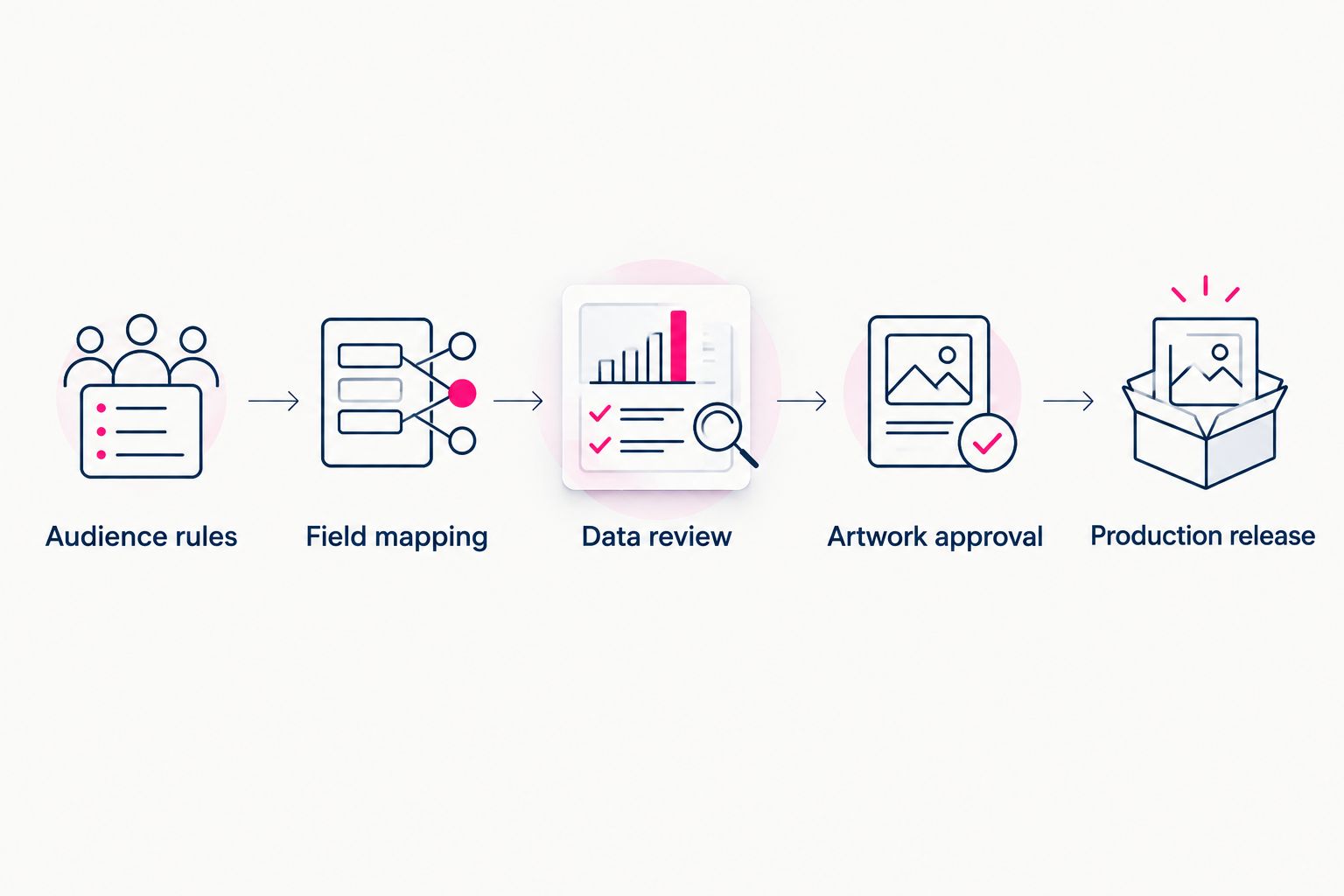
Approve the audience and artwork before releasing the campaign to production.
Prepare a quote-ready brief
A useful brief lets the printing team assess the project without interpreting a raw customer file. For your 2026 campaign, include:
- The business objective and intended recipient group.
- The proposed printed format and quantity, if decided.
- Artwork status and any personalization requirements.
- A description of the mailing data and known address issues.
- The desired delivery window and approval contact.
- Questions about address processing, mailing preparation, and secure transfer.
Do not send your full customer database just to start a quote. Describe the file first and request the appropriate transfer instructions. Share only the information needed for the agreed work.
Use the quote request to discuss the scope with State 48 Print. Confirm responsibilities for data preparation, proofing, mailing, and timing in the project agreement rather than assuming a general printing service includes every task.
Recurring campaigns when customer records change
A recurring campaign uses the same preparation rules on a new selection of customer records. It is not automatically a live connection between your customer database and printing production.
For a repeatable 2026 workflow, define the qualifying event in plain language: a customer enters a selected segment, completes a relevant transaction, or reaches a campaign-defined milestone. Use only data you are authorized to process for that purpose.
Then establish the release controls:
- Define the selection window. Record when eligibility begins and ends for each batch.
- Refresh exclusions. Apply current do-not-mail requests and campaign-specific exclusions before every release.
- Check mailing history. Keep a record of released recipients so the same eligible record does not trigger an unintended repeat.
- Require approval. Review the batch and artwork version before the agreed transfer.
Expected result: A recurring batch process with a known owner and an approval checkpoint. If your source system supports scheduled exports, confirm its actual controls before using them; do not assume a saved customer segment transfers itself.
The trade-off is maintenance. Repeated campaigns reduce repeated setup decisions, but stale selection rules can reproduce the same mistake across later mailings.
Troubleshooting
The file contains fewer recipients than expected
Compare counts at each stage: original selection, exclusions, duplicate review, and unresolved address exceptions. These are different reductions. Keep an exception summary so you can explain where records left the audience without restoring suppressed contacts.
Several mailpieces go to the same address
Revisit the mailing-unit rule. Shared addresses are not automatically errors, particularly for business recipients. Check whether the duplicate is an unintended repeat of the same recipient or a deliberate mailing to different people.
Postal codes lose their leading zeros
Return to the source export and preserve postal-code fields as text. Do not guess missing digits from a damaged spreadsheet. Inspect the final transferred file, not only the spreadsheet view used during editing.
Personalized text is blank or awkward
Check the source field, field mapping, and fallback rule. Test long values and missing values in the agreed proofing process. If personalization adds no useful context, remove it instead of filling the piece with unreliable customer details.
An old customer file reaches production
Use distinct version names and a single release owner. Identify the approved audience and artwork together in the release message, and explicitly withdraw superseded files. A folder full of similarly named exports is not an approval system.
Customize your workflow
Improve control before adding complexity. Your next campaign can reuse the audience definition, mapping sheet, exception rules, and approval checklist while changing the audience or message.
State 48 Print provides commercial printing and mailing alongside vehicle wraps, signage, trade show displays, and other business printing services. If your campaign includes several physical touchpoints, describe them in the brief so the project discussion covers the full requirement.
For 2026 reporting, define the response action before printing. Record campaign identifiers consistently and decide how your team will connect responses to the mailing. Do not treat every later customer purchase as proof that the mailpiece caused it.
FAQ
How do I turn my customer list into a direct mail campaign?
Export a defined audience, apply exclusions, map the required mailing fields, and approve the data alongside the artwork. Confirm the printer’s file requirements and transfer process before sending customer records.
Do I need a direct integration with my customer database?
No. A reviewed file export can connect your customer database to a direct mail production workflow. A recurring process still needs current exclusions, mailing-history checks, and approval controls.
What customer information belongs in a mailing file?
Include the recipient and address fields required for the agreed mailing process, plus any approved personalization fields. Exclude unrelated customer information and confirm the requested column structure before export.
Should I remove everyone with the same mailing address?
No. Define whether the campaign targets a person, household, or business location before removing duplicates. Different recipients can legitimately share an address.
Can State 48 Print help with a direct mail project?
State 48 Print offers commercial printing and mailing for businesses nationwide. Request a quote to confirm the requirements and responsibilities for your specific list, artwork, data preparation, and mailing project.
Can I reuse the same mailing file for another campaign?
Refresh the audience and exclusions before reusing a mailing file. Customer details, campaign eligibility, and do-not-mail requests can change between releases.
What should I approve before a direct mail campaign is printed?
Approve the intended audience, exclusions, mailing-file version, artwork, response details, and any personalization. Confirm the agreed proofing process and resolve exceptions before authorizing production.
One last thing
Keep a record of what you actually mailed, not just what you intended to mail. Save the released audience version, approved artwork, selection rules, and approval record under your organization’s data-retention policy. That record gives the next campaign a reliable starting point without turning an old export into a permanent mailing list.